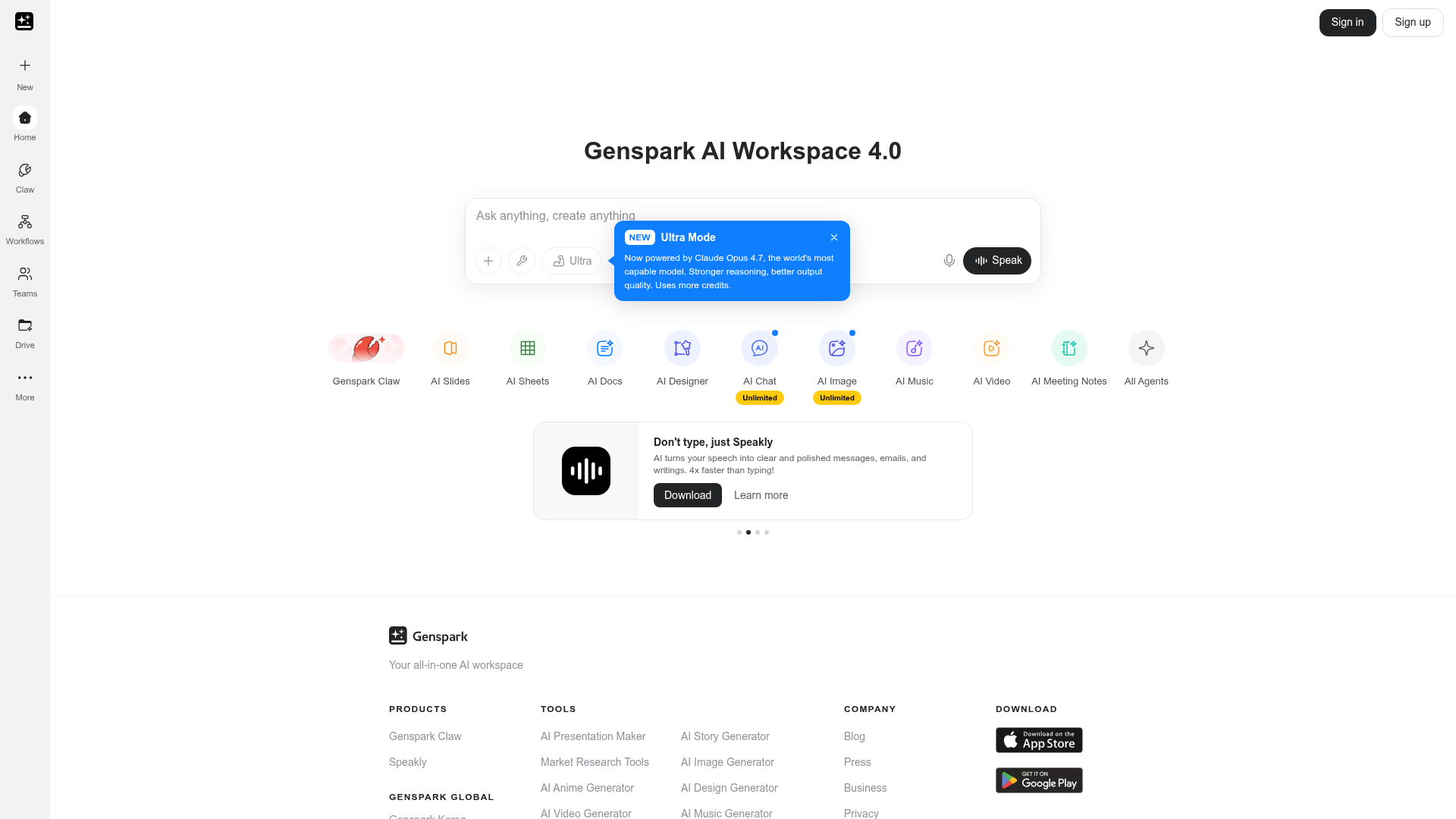
The appeal of Genspark is that you do not need to switch between five different AI tools for different tasks. You can draft a document, build a slide deck, generate an image, create a short video, and compose a music track — all from the same logged-in environment with your context and history carrying through.
AI Slides. Generate presentation slides from a prompt or document. The output quality is better than most dedicated presentation AI tools because Genspark draws on its broader model context rather than a narrow template system. You can edit slides after generation and export them for use in other tools.
AI Sheets and Docs. The spreadsheet and document tools work for research summaries, content plans, content calendars, and data organization. They are not replacements for Excel or Google Docs for complex tasks, but for creator workflows — drafting scripts, organizing ideas, summarizing research — they cover a lot of ground.
AI Image, Video, and Music. Image and video generation are unlimited on higher plans, which is notable. The AI Music tool lets you generate background music or short audio tracks for your content. These are useful supplementary tools rather than professional-grade replacements, but having them inside the same workspace means less friction when you need something quickly.
Genspark Claw desktop app. Claw is a separate desktop application that links your local computer with cloud computers in a unified workspace. It is designed for managing files and workflows across environments and feels aimed at more advanced users who want to automate tasks across their setup.
Chrome extension and Meeting Bot. The Chrome extension adds a sidebar to any page that can summarize content, answer questions, and automate tasks while you browse. The Meeting Bot connects to your calendar, auto-joins meetings, and emails you notes afterwards — a practical time-saver if you have regular calls.
Who Is It For?
Genspark suits creators and marketers who want fewer tools open at once and are comfortable with AI-generated outputs as a starting point rather than a finished product. It is particularly useful for content research, planning documents, and quick presentation drafts. If you already have dedicated tools for each of these tasks that you are happy with, Genspark may feel redundant — it is most valuable when you are consolidating.
Best Niches to Use With
Pros and Cons
- ✅ Wide range of tools in one workspace — slides, docs, images, video, music
- ✅ Ultra Mode runs on Claude Opus for stronger reasoning and output quality
- ✅ Chrome extension adds AI assistance to any webpage
- ✅ Meeting Bot auto-joins calls and sends notes to your inbox
- ✅ Free tier available to explore before committing
- ❌ Ultra Mode uses credits — heavy use can burn through them quickly
- ❌ Individual tools are not as deep as standalone specialist tools
- ❌ Genspark Claw desktop app has a steeper learning curve than the web tools
Pricing
Genspark offers a free tier with credit-based access to most tools. Paid plans unlock higher credit limits, unlimited image and video generation, and priority access to the latest models. Check their website for current pricing as plans are updated frequently with new model releases.
Summary
Genspark is genuinely useful if you find yourself bouncing between too many AI tabs. Having slides, documents, image generation, video, and music under one login reduces friction for everyday content creation tasks. The Claude Opus Ultra Mode is a meaningful upgrade for complex research and writing tasks. It is not trying to replace professional-grade tools for each category — it is trying to be the one place you open first, and for many creator workflows, that is exactly what you need.
Try Genspark Free →
Frequently Asked Questions
What is Genspark AI?
Genspark AI is an all-in-one AI workspace that combines slides, spreadsheets, documents, image generation, video creation, and AI music in a single platform. It also includes AI agents capable of browsing the web and completing multi-step tasks, plus a desktop browser called Genspark Claw.
Is Genspark AI free?
Yes, Genspark offers a free tier with access to core tools including AI slides, documents, and basic agent capabilities. Usage limits apply on the free plan. Paid plans unlock higher usage limits, more powerful AI agents, and priority access to newer features.
How does Genspark compare to ChatGPT?
ChatGPT is primarily a conversational AI and writing assistant. Genspark includes those capabilities but adds structured output tools — presentations, spreadsheets, and video creation — in a more visual workspace. For creators who need polished deliverables rather than raw text output, Genspark is more practical.
What is Genspark Claw?
Genspark Claw is a desktop browser powered by AI agents that browse the web, research topics, and complete tasks for you. The idea is that it works alongside the Genspark workspace — gather your research with Claw, then turn it straight into content without jumping between a dozen different apps.
Is Genspark AI good for content creators?
Yes, particularly for creators who need a variety of content formats. Genspark's ability to create slides for YouTube videos, generate AI images and music, and produce short-form video from text makes it a useful all-in-one tool for solo creators who want to minimise the number of subscriptions they pay for.